TL;DR:
- GPS trail navigation combines satellite positioning, digital mapping, and route overlays to guide hikers in real time without cellular service. Loading GPX tracks and offline maps onto devices ensures accurate route following and quick off-course detection, especially when preparing properly before the trail. Combining digital tools with traditional map and compass skills provides the safest and most reliable navigation system for outdoor adventures.
GPS navigation on trails is the practice of using a satellite-connected device or app to display your real-time position on a digital map, allowing you to follow a planned route and correct your course without cellular service. Devices range from smartphones running apps like Gaia GPS or AllTrails, to dedicated handheld units like the Garmin eTrex 32x, to GPS-enabled smartwatches. What is GPS navigation hiking, at its core? It is the combination of satellite positioning, digital mapping, and route overlays working together so you always know where you are, where you are headed, and how far you have left to go.
How does GPS navigation work on hiking trails?
A GPS receiver calculates your position by measuring signals from at least four satellites simultaneously. The device converts those signals into latitude and longitude coordinates, then plots that point on a loaded digital map. GPS provides live location and heading data, while navigation itself comes from route or track overlays combined with features like elevation profiles and waypoints. The result is a moving dot on a map that updates every few seconds as you walk.
Here is what that process looks like in practice on a trail:
- Satellite lock: Your device acquires signals from the Global Navigation Satellite System (GNSS), which includes the American GPS constellation, Russia’s GLONASS, and Europe’s Galileo.
- Position fix: The receiver triangulates your coordinates to within roughly 10 to 30 feet on a standard smartphone, or as close as 6 feet on advanced multi-band units.
- Map overlay: Your coordinates are plotted on a pre-loaded digital map, showing terrain, trail lines, and elevation contours.
- Route following: A loaded GPX track or planned route draws a visible line on the map. You follow that line in real time.
- Waypoints and breadcrumbs: You can mark specific points (a campsite, a water source, a junction) as waypoints. Breadcrumb trails record every step you take, so you can retrace your path if needed.
Pro Tip: Lock your GPS signal before leaving the trailhead parking area. Acquiring satellites in an open clearing is faster and more accurate than trying to get a fix under dense tree cover.
What are GPX tracks and how do they enhance GPS trail navigation?
A GPX (GPS Exchange Format) file is a standardized data file that stores a sequence of coordinates, altitude readings, and distance markers describing a trail route. GPX files contain coordinates, altitude, and distance for precise navigation overlays, which is why loading one onto your device transforms a blank map into a guided trail experience. Think of a GPX track as the digital equivalent of someone drawing the exact path on your map before you leave home.
When you load a GPX track into an app or GPS unit, the route appears as a colored line on your map screen. Your moving position dot stays on or near that line as you hike. If you drift off course, the gap between your dot and the route line tells you immediately. Effective GPS navigation using loaded GPX tracks shows not just your location but your position projected relative to the route line, making reorientation fast and stress-free.
Where to find and use GPX files:
- AllTrails: Download GPX files for millions of trails directly from the app or website.
- Gaia GPS: Supports GPX import and lets you record your own tracks to share.
- Garmin Explore: Garmin Trails lets users filter curated routes by difficulty, distance, and ascent, then send them directly to compatible devices.
- Komoot and Wikiloc: Community-sourced platforms where hikers upload and share GPX tracks for specific regions.
- Your own recordings: Record a hike once and reuse the track as a navigation file on future trips.
Pro Tip: Always verify a downloaded GPX track against a paper map or satellite imagery before you rely on it. Community-uploaded tracks occasionally contain errors or outdated trail reroutes.
| Feature | GPX Track | Manual Waypoints |
|---|---|---|
| Route visibility | Full line on map from start to finish | Individual points only |
| Off-course detection | Instant visual gap between dot and line | Limited to marked points |
| Setup effort | One file download or import | Manual entry per point |
| Best use case | Following a known trail precisely | Marking key locations on open terrain |
Smartphone apps versus dedicated GPS units: which is better for trail navigation?
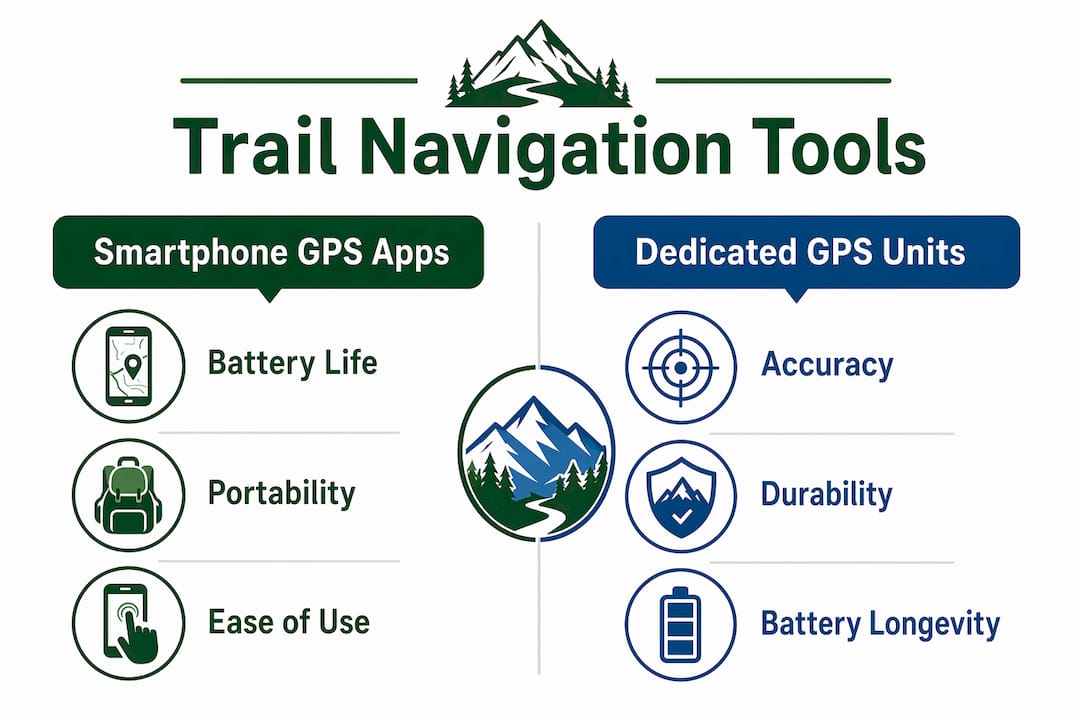
Smartphones work well for day hikes on marked trails, but dedicated GPS units outperform them on multi-day trips because of battery life and cold-weather reliability. This is not a minor difference. A Garmin eTrex 32x runs on AA batteries for up to 25 hours. A typical smartphone running GPS navigation drains its battery in 4 to 8 hours, depending on screen brightness and signal conditions.
Accuracy is another real gap. Multi-band GNSS receivers in advanced GPS units improve positional accuracy to roughly 6 feet under forest canopy, compared to 15 to 30 feet on most smartphones. Under heavy tree cover or in deep canyons, that difference can mean the gap between staying on trail and losing your route line entirely.
| Factor | Smartphone GPS app | Dedicated GPS unit |
|---|---|---|
| Battery life | 4 to 8 hours | 20 to 30+ hours |
| Accuracy under canopy | 15 to 30 feet | ~6 feet (multi-band) |
| Cost | App cost only ($0 to $40/year) | $150 to $600+ for device |
| Durability | Fragile, water-sensitive | Rugged, waterproof |
| Map updates | Frequent, cloud-based | Manual updates required |
| Best for | Day hikes, marked trails | Multi-day, off-trail, winter |
The smart approach for serious hikers is layering. Use your smartphone as your primary navigation tool on well-marked trails. Carry a dedicated GPS unit or a GPS-enabled watch as a backup. Serious hikers use layered navigation to maintain safety if any single device fails. Add a paper map and compass as the final fail-safe, and you have a system that works even when technology does not.
Apps like AllTrails and Gaia GPS cover most day-hiking needs well. AllTrails includes a GPS details view with live coordinates, elevation, bearing, and supports dynamic route adjustments mid-hike, which reduces decision stress at confusing trail junctions. For off-trail navigation or extended backcountry trips, a dedicated unit is the more reliable choice.
How to prepare your GPS navigation system before hitting the trail
Preparation is where most GPS failures actually happen. The device works fine. The problem is that the maps were never downloaded, the route was never loaded, or the battery died at mile three. Follow these steps before every hike:
- Download offline maps. Offline content must be downloaded in advance before you leave cell service. In Gaia GPS, select your region and download the map tiles. In AllTrails, tap “Download” on the trail page. In Garmin Explore, sync your device while connected to Wi-Fi.
- Load your GPX route. Import the GPX file for your planned trail into your app or device. Confirm the route line appears correctly on the offline map before you leave home.
- Check map data accuracy. Map source affects routing options and offline visibility. If a trail section does not appear on one map layer, switch to an alternate source like OpenStreetMap or a satellite overlay.
- Charge everything fully. Start every hike with 100% battery on your phone and GPS unit. Carry a power bank rated at least 10,000 mAh for day hikes and 20,000 mAh for multi-day trips.
- Pack spare batteries or a solar charger. Battery management is critical for multi-day trips. GPS units that use AA or AAA batteries give you the option to swap in fresh cells anywhere.
- Bring a paper map and compass. Mark your trailhead, key waypoints, and campsite on the paper map before you go. This is your backup if every electronic device fails.
Pro Tip: Do a full navigation test at home the night before your hike. Open your app in airplane mode, confirm the offline map loads, and verify the GPX track appears. Five minutes at home saves hours of confusion on the trail.
Best practices for safe and effective GPS trail navigation
GPS navigation is a tool, not a guarantee. GPS navigation supplements but does not replace fundamental skills like map reading and compass use. Hikers who rely entirely on a single device without backup skills create real risk for themselves.
These practices keep you safe and confident on any trail:
- Know your GPS accuracy limits. Standard smartphone GPS is accurate to 15 to 30 feet. On narrow switchbacks or near cliff edges, that margin matters. Use your surroundings to confirm what the screen shows.
- Use breadcrumb trails actively. Turn on track recording from the moment you leave the trailhead. If you need to retrace your steps, the breadcrumb trail is your most reliable guide back.
- Mark waypoints at key decision points. Set a waypoint at every major junction, water source, and campsite. This creates a personal navigation layer on top of your loaded route.
- Monitor battery use every hour. Check your remaining battery at each rest stop. If you are below 30% with significant distance remaining, switch to low-power mode or activate your backup device.
- Practice before a serious trip. Use your GPS app or device on a familiar local trail first. Learn how the interface works, how to zoom the map, and how to re-center your position before you need those skills in an unfamiliar place.
- Verify trail coverage before you go. Outdoor navigators should verify trail coverage and consider alternate map layers if routing fails on less-traveled routes.
Key takeaways
GPS trail navigation works best when you combine a loaded GPX route, offline maps, a reliable power source, and a paper map backup into one layered system.
| Point | Details |
|---|---|
| GPS navigation defined | A GPS receiver plots your live position on a digital map for real-time route following. |
| GPX tracks are central | Loading a GPX file draws a route line on your map, making off-course detection instant. |
| Device choice matters | Smartphones suit day hikes; dedicated GPS units are more reliable for multi-day trips. |
| Preparation prevents failure | Download offline maps, load routes, and charge all devices before leaving home. |
| Layered navigation is safest | Combine a GPS app, a backup device, and a paper map for reliable trail safety. |
Why I trust GPS navigation but never hike without a paper map
I have guided and hiked the Peaks of the Balkans trail more times than I can count, and GPS navigation has genuinely changed how safely and confidently people move through that terrain. The trail crosses three countries, Kosovo, Albania, and North Macedonia, and cell service disappears for long stretches. Hikers who arrive with a loaded GPX track and offline maps on Gaia GPS or a Garmin device navigate those sections with real confidence.
That said, I have seen GPS devices fail at the worst moments. A phone screen goes dark in freezing rain. A GPS unit loses satellite lock in a deep canyon. A downloaded map tile stops at the exact section you need. Every time I have seen someone get genuinely disoriented, they were relying on a single device with no backup. The hikers who handled those situations calmly always had a paper map in their pack and knew how to read it.
My honest recommendation: treat GPS navigation as your primary tool and invest time learning it well. Use AllTrails or Gaia GPS for route planning and real-time navigation. Carry a dedicated GPS unit if you are doing multi-day or off-trail sections. And always, always bring a paper map for safer trails as your final backup. The technology is excellent. The wilderness does not care about your battery percentage.
— Virtyt
Plan your next trail adventure with Peaksofthebalkans
The Peaks of the Balkans trail is one of the most rewarding long-distance hikes in Europe, and GPS navigation is a core part of hiking it well. Peaksofthebalkans offers detailed trail guidance, GPX route files, and practical navigation advice specifically for this 192-kilometer route through Kosovo, Albania, and North Macedonia. Whether you prefer a self-guided hiking tour with full GPS support or want to explore with experienced local guides, Peaksofthebalkans has the resources to help you prepare. Visit Peaksofthebalkans to explore tour options, download trail information, and start planning your GPS-assisted adventure today.
FAQ
What is GPS navigation on trails?
GPS navigation on trails is the use of a satellite-connected device or app to display your real-time position on a digital map and follow a pre-planned route. It works without cellular service as long as offline maps and routes are downloaded in advance.
What are the best GPS apps for trail hiking?
Gaia GPS and AllTrails are the most widely used GPS apps for trail hiking. AllTrails offers a GPS details view with live coordinates and elevation, while Gaia GPS supports advanced GPX import and detailed topographic maps.
Do I need a dedicated GPS unit or will my phone work?
A smartphone works well for day hikes on marked trails, but a dedicated GPS unit like the Garmin eTrex 32x is more reliable for multi-day or off-trail trips due to longer battery life and better accuracy under forest canopy.
What is a GPX track and why does it matter for navigation?
A GPX track is a standardized file containing a sequence of GPS coordinates, altitude data, and distance markers that draws a route line on your map. Loading a GPX track lets you see your position relative to the planned route in real time, making it easy to detect and correct any drift off course.
Can GPS navigation replace a paper map and compass?
GPS navigation does not replace a paper map and compass. Electronic devices can fail due to battery drain, water damage, or signal loss, so carrying a paper map and knowing how to use a compass remains a critical safety practice on any serious hike.
 English
  Deutsch
  Français
  Nederlands (België)
  עִבְרִית